What you're actually downloading when you add Fishin Frenzy to your phone
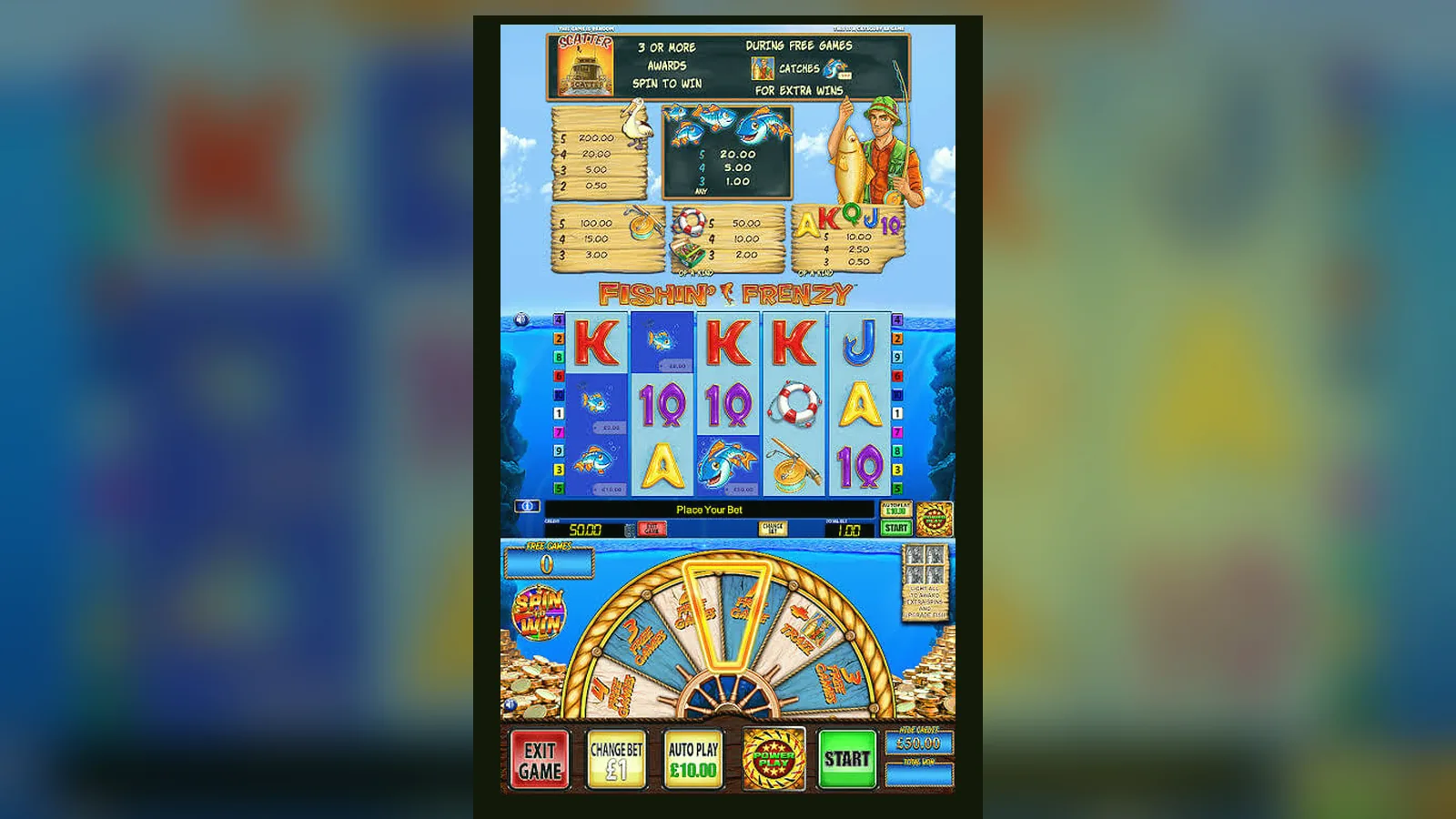
Fishin Frenzy isn't a standalone app you pull from the Play Store or App Store — it's a browser slot wrapped in an operator's casino platform. What looks like «download» is usually a shortcut to the mobile site, a progressive web app, or the operator's own casino app that hosts hundreds of games, Fishin Frenzy among them.
The confusion stems from search habits: you type «Fishin Frenzy app», expect a green Install button, and land somewhere between a legitimate UKGC-licensed casino and a dodgy APK mirror. This page walks through what's real, what's a web app pretending to be native, what an APK actually gives you, and which permissions should make you close the tab.
The store-style card you'd see if Fishin Frenzy were a Play Store listing
Blueprint Gaming doesn't publish a single-game app. But if they did, the metadata would look like this — it's a snapshot of what a legitimate casino app hosting Fishin Frenzy shows in its listing, translated to slot-specific terms.
The download count reflects the operator's app, not Fishin Frenzy alone. The rating mixes general casino experience with game performance. Size is the compressed bundle; first load over 4G takes 8–12 seconds, subsequent sessions are instant from cache.
Five screens and what each one asks you to decide
The interface is three fixed zones and two overlays. Understanding the layout means you know where to tap when volatility turns against you.
- Main reel grid: 5×3, symbols stacked on reel 1 in the base game, scattered across reels 2–5. The grid fills the centre third of the screen; on a 6.1-inch display, each symbol is roughly 1 cm tall. No accidental taps — the reels are touch-dead during a spin.
- Stake and balance bar: bottom left shows your current stake (£0.10 to £5.00 in twelve steps, or £2.00 max if you're 18–24 and the operator enforces the lower cap). Bottom right is balance, updated in real time after each spin. The currency symbol is always £, no toggle.
- Autoplay and settings tray: bottom centre. Autoplay lets you queue 10, 25, 50 or 100 spins with loss and single-win limits. The settings icon opens sound toggle, game rules and paytable. The paytable is static images; it doesn't recalculate for your current stake, so multiply manually.
- Free-spins overlay: when three or more fishermen scatter, the screen dims, a cartoon boat slides in from the left, and a counter shows 10, 15 or 20 spins awarded. The overlay dismisses after two seconds; you're straight into the feature with no «click to start» friction.
- Big-win animation: any win above 10× stake triggers a coin-splash graphic and a rolling counter. It takes four seconds to count up to £50.00, which feels long when you want the next spin. No skip button — wait it out or refresh the page, losing the animation and resetting the session.
The design prioritises speed: two taps to adjust stake, one tap to spin, zero taps if autoplay is on. The trade-off is that accidental deposits are easier when the balance hits zero and a top-up prompt appears mid-session.
Four installation paths, numbered steps and the actual risk of each
There's no universal Fishin Frenzy installer. The method depends on whether you trust the operator, whether you want a home-screen icon, and whether you're willing to side-load an APK that Google didn't vet.
Path 1: Browser play (zero install)
- Open Chrome, Firefox or Safari on your phone.
- Navigate to a UKGC-licensed casino site — check the footer for the licence number and cross-reference it in the UKGC public register.
- Log in (age and identity verified at sign-up; some sites require document upload before you see the lobby).
- Type «Fishin Frenzy» in the game search or find it under Blueprint Gaming in the provider filter.
- Tap the thumbnail; the game loads in a full-screen HTML5 frame. Stake, spin, cash out — all in the browser. Refresh loses your session; balance persists because it's server-side.
Risk: Near zero if the operator holds a valid UKGC remote licence. The game runs on Blueprint's certified RNG servers; your phone is just a remote control. The only vulnerability is phishing — a fake site that mimics the real one and harvests your login. Check the domain carefully and look for the padlock icon.
Path 2: Add to home screen (progressive web app)
- Load Fishin Frenzy in the browser as above.
- On Android Chrome: tap the three-dot menu, select «Add to Home screen», name the shortcut.
- On iOS Safari: tap the Share icon, scroll down, tap «Add to Home Screen».
- The icon appears on your home screen; tapping it opens the game in a chromeless browser window that looks native.
Risk: Same as browser play. The «app» is a bookmark with a custom icon. It's offline-capable if the site registers a service worker, but Fishin Frenzy requires a live connection to the game server, so offline mode only caches the lobby.
Path 3: Operator's casino app (Play Store / App Store)
- Search the Play Store or App Store for the casino brand (e.g., «Betfred Casino», «Coral Slots»).
- Verify the developer name matches the operator and read the age rating (must be 18+).
- Install the app (typically 60–120 MB, covering the lobby and several game engines).
- Log in with your existing account or register inside the app (ID upload required before first deposit).
- Navigate to Fishin Frenzy in the game library; it opens in a WebView or embedded game client.
Risk: Low if you download the official operator app from Google or Apple's store. Both vet apps for malware, and UKGC licensing rules require secure credential handling. The app collects device ID and location (geofencing to confirm you're in the UK), which is standard for licensed gambling. The risk is data leakage if the operator suffers a breach, but that's an operator problem, not a Fishin Frenzy problem.
Path 4: APK side-load (Android only, high risk)
- A website offers a «Fishin Frenzy APK» or «Fishin Frenzy Mod» download. You tap it; a .apk file lands in your Downloads folder.
- Android blocks the install by default. You open Settings > Security > Install unknown apps, grant permission to your browser or file manager.
- You run the APK. It installs an app with a Fishin Frenzy icon.
- You open it. It either points you back to a browser casino (pointless wrapper) or it's a fake game with rigged reels and no real-money payout path (scam), or it's a Trojan that silently requests SMS and contacts permissions (malware).
Risk: High to extreme. Blueprint doesn't distribute APKs. Any «official Fishin Frenzy APK» is either a repackaged operator app (violates Google's ToS, no guarantee it's unmodified) or malware. The permission red flags: SMS read/send (used for premium-rate scams), contacts access (spam vector), device admin rights (ransomware lockout). If an APK asks for anything beyond storage and network, delete it.
Phone requirements and what happens when your hardware can't keep up
Fishin Frenzy is HTML5, so it runs on any device with a modern browser. But «runs» doesn't mean «runs well»:
- Minimum: Android 8.0 or iOS 12, 2 GB RAM, Chrome 90+ / Safari 14+. The game loads, symbols animate at 30 fps, you can play. On a three-year-old budget phone over 3G, expect four-second spin cycles and occasional stutters when the free-spins overlay appears.
- Recommended: Android 11 or iOS 15, 4 GB RAM, stable 4G or Wi-Fi. Animations hit 60 fps, spins resolve in under two seconds, balance updates don't lag behind reel stop.
- What breaks first: Older phones throttle the CPU after ten minutes of continuous play to manage heat. The game doesn't crash, but spins start taking three seconds instead of two, and the big-win animation drops frames. This isn't a fairness issue — the RNG result is decided server-side before the reels even render — but it's annoying when you're 40 spins into a 100-spin autoplay queue.
- Data use: 1.2 MB for the initial asset load, then 8–12 KB per spin (server sends the result, your phone animates it locally). An hour of play at 20 spins per minute burns roughly 15 MB. On a capped mobile plan, that's £0.00 in overage if you're under 1 GB for the month, but international roaming without a data package will cost you more than the session's losses.
What this version actually changed and why you'd care
Version 2.1.8 (March 2026 release) isn't a headline feature drop; it's maintenance and compliance. Here's what moved:
- Stake-cap enforcement for 18–24 players: The game now reads your account age from the operator's API and locks the stake selector at £2.00 if you're under 25. Previously, enforcement sat at the operator level; some sites let younger players spin at £5.00 by accident. This closes that gap.
- Faster asset preload on 5G: The initial load dropped from 12 seconds to 8 seconds on high-speed connections by lazy-loading the free-spins background music until the feature triggers. If you never hit the bonus, you never download that 1.1 MB file.
- Deposit-reminder frequency reduced: The game used to ping you with a balance top-up prompt every 15 spins after hitting zero. That's now every 30 spins, following updated CAP Code guidance on not pressuring players mid-session.
- Session-time display moved to settings: A clock showing total session duration (required under UKGC rules) is now in the settings tray rather than fixed in the top-right corner. Some players found it intrusive; others ignored it. The data suggests it didn't change behaviour either way, so it's now opt-in to view.
Nothing here affects RTP, volatility or hit frequency. The paytable is identical to version 2.1.6. If you're returning after a six-month break, the game plays exactly as you remember; you just can't miss the stake cap if you're 23, and the lobby loads slightly faster.
Spotting a fake clone and the permission requests that mean walk away
Fake Fishin Frenzy apps exist because the name ranks well in search and casual players don't always check the source. The clones fall into three categories:
- Reskin with fake currency: Looks like Fishin Frenzy, same symbols, same layout. You «deposit» via in-app purchase, play with chips that have no cash-out path. The RNG isn't certified, the payout rate is whatever the developer set it to, and you're buying entertainment tokens, not gambling. Legal in the UK as a game, but misleading if it imitates a real-money slot without disclosing the difference upfront.
- Redirector shell: An APK that shows the Fishin Frenzy logo, then opens a browser pointed at an unlicensed casino site (often Curacao or Costa Rica licensed, not UKGC). The app itself does nothing; it's a wrapper to bypass app-store gambling restrictions. The site it points to won't have GAMSTOP integration, won't enforce £5 stake caps, and won't pay out if you win big — no UK legal recourse.
- Malware pretending to be the game: Installs, asks for permissions, shows a loading screen that never finishes. Meanwhile, it's reading your SMS for two-factor codes, scraping contacts, or subscribing you to premium-rate services. Some variants display a fake login form that harvests your casino credentials, then use them to drain your real account on a legitimate site.
Red-flag permissions (if an APK asks for these, delete it immediately):
- SMS send and read: No slot game needs to send texts. This is for premium-rate scams or intercepting bank verification codes.
- Contacts access: Used to spam your address book or cross-reference your network for phishing targets.
- Device admin or accessibility service: Grants the app control over other apps, used by ransomware to lock you out or by spyware to record screen content.
- Call logs: No legitimate reason for a game to know who you've phoned.
- Camera and microphone without a clear feature need: If the game has no video-chat support feature or AR mode, this is surveillance.
Legitimate operator apps ask for location (geofencing to confirm you're in the UK, required by UKGC licence conditions) and storage (to cache game assets and save login tokens). Everything else is optional and explained in the permission prompt.
How to verify you're on a real UKGC-licensed site before you download anything: scroll to the footer, find the licence number (format: 000-000000-R-000000-000), copy it, paste it into the UKGC public register search at gamblingcommission.gov.uk, confirm the operator name matches. If the footer says «licensed in Curacao» or shows no number, you're on an unlicensed site. It's not illegal for you to play there, but you have no regulatory protection if they refuse to pay out, and UK banks are instructed to block transactions to unlicensed operators as of April 2025 policy guidance. If a site accepts credit cards for gambling, it's fake or operating outside UK jurisdiction — credit cards have been banned for UK online gambling since April 2020.
FAQ
Can I download Fishin Frenzy directly from the Play Store as a standalone app?
No. Blueprint Gaming doesn't publish single-game apps. Fishin Frenzy runs inside casino operator apps (which are in the Play Store and App Store) or directly in your mobile browser. Any «Fishin Frenzy App» listing that isn't part of a licensed casino's app is either a fake reskin or a redirector to an unlicensed site. Stick to UKGC-licensed operator apps or browser play.
What's the difference between adding the game to my home screen and installing an actual app?
Adding to home screen creates a shortcut that opens the game in a browser window without the address bar — it looks like an app but it's still a website. An operator's casino app is a native download from the Play Store or App Store, installs locally (60–120 MB), and can cache multiple games. Functionally, both get you to the same Fishin Frenzy game server. The home-screen shortcut is faster to set up; the native app loads the lobby slightly quicker on repeat visits.
If I install an APK from a third-party site, will I get the real game with real payouts?
Almost certainly not. Blueprint doesn't distribute APKs. Third-party Fishin Frenzy APKs are either fake games with rigged RTPs and no cash-out, wrappers that redirect you to unlicensed casinos, or malware. You're also bypassing Google's vetting, so permissions that would normally be blocked (SMS access, contacts, device admin) can be granted by accident. The risk far outweighs any convenience. Use a UKGC-licensed operator's browser site or official app instead.
Why does the game ask for my location, and can I refuse it?
UKGC licence conditions require operators to verify you're physically in the UK before you play for real money (geofencing). The location request comes from the operator's app or site, not from Fishin Frenzy itself. If you refuse, you can browse the lobby and play demos, but real-money play will be blocked until you allow location access. This isn't tracking your movements — it's a one-time check per session to confirm jurisdiction.
Does Fishin Frenzy work offline, or do I need a constant internet connection?
You need a live connection. Each spin's result is generated on Blueprint's RNG server and sent to your phone; your device animates the reels based on that result. The game can cache visual assets (symbols, backgrounds, sounds) so subsequent sessions load faster, but without a connection, you can't spin. This is true for all regulated online slots — the RNG and balance ledger are server-side to prevent tampering.